
Compliance and Authorization
ATOATO Workflow
An authorization that AI accelerates at every phase.
Seven RMF phases and twenty three stages as a managed workflow. Evidence is analyzed by a local model where it is uploaded, ten package documents write themselves from the data, AVISSAA and PolicyForge sit inside the stages that need them, and continuous monitoring runs POA&M, threat intelligence and system changes from one dashboard. Timed from day one.
ActiveI.2 Upload Evidence and AI Analysis
Since start
41 d 06 h
This phase
9 d 14 h
AI analysis
3 h 12 m
Controls in scope
287
Satisfied
164
Docs generated
3 of 10
Illustrative package. System and clocks invented.
The whole thing, on one screen
The authorization lifecycle, running as software.
Seven RMF phases and twenty three stages, each one a stage in a managed workflow rather than a document someone is chasing. A local model sits inside the phases where the work is heaviest, and the package documents write themselves from what the workflow already knows.
The RMF lifecycle, as a managed workflow
- 01
Prepare
3 stages
Register, assign, strategy
- 02
Categorize
4 stages
Information types, impact, the record
- 03
Select
2 stages
Baseline, tailoring, inheritance
- 04
Implement
3 stages
Resources, evidence with AI analysis, final SSP
- 05
Assess
5 stages
Plan, assessment, results, remediation, SAR
- 06
Authorize
4 stages
Risk determination, decision, letter
- 07
Monitor
2 stages
Continuous monitoring, permanent
Monitor feeds back in. The package never goes stale.
Where a local model does the work
Evidence analyzed at the upload
What to collect, before you collect it
The missing policy language, drafted
Access Control assessed from live state
Input boxes in, full documents out
Monitoring from one dashboard
What the workflow produces
- FIPS 199 Categorization
- System Security Plan
- Security Control Traceability Matrix
- Security Assessment Plan
- Security Assessment Report
- Plan of Action and Milestones
- Authorization Package
- Authorization Letter
- Continuous Monitoring Plan
- ConMon Status Report
- 9 more planned
Where the AI does the work
Every phase has a model in it, and a person deciding
The workflow is not a checklist with an AI button on the side. Each phase that used to be weeks of reading, writing and chasing has a model doing the reading and the writing, and a seat ratifying the result.
Evidence analyzed at the upload
Upload against a control or a whole family. A local model returns a verdict, indicators, typed gaps and a recommended action. Several artifacts get one combined verdict. An assessor ratifies.
Evidence AnalyzerWhat to collect, before you collect it
Beside every control's upload, AVISSAA lists the artifacts an assessor will expect, what each shows and how it is assessed, in a different mode depending on whether the control already has a verdict.
AVISSAAThe missing policy language, drafted
A policy or procedure gap found in evidence analysis hands to PolicyForge, which drafts the section that closes it. Copy it or save it to the library as an amendment.
PolicyForgeAccess Control assessed from live state
An agent reads account, role and entitlement state from your identity platform and assesses the AC family against it. The first of a series of family agents.
Access Control AssessmentInput boxes in, full documents out
You fill in the specific facts each stage asks for. The workflow generates the FIPS 199, SSP, SAP, SAR, POA&M, the ConMon plan and the authorization package from them, formatted and versioned.
Monitoring from one dashboard
POA&M operations, threat intelligence ranked by AREA, system changes and reauthorization, all in the phase that never ends. See below.
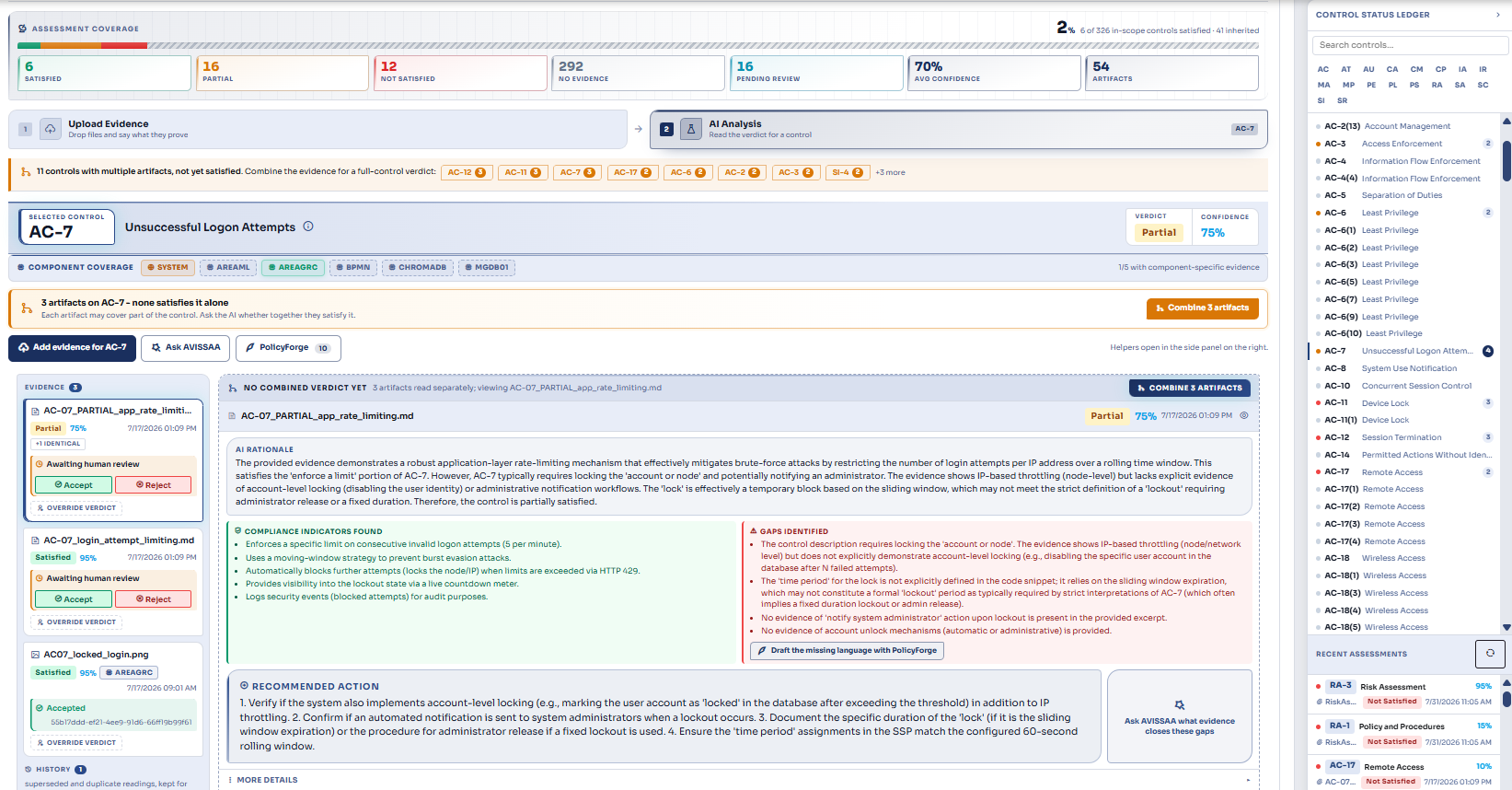
Generative documentation
Fill in the boxes. The package writes itself.
You enter the specific facts the workflow asks for at each stage: the system, its categorization, the controls, the findings. From that input the workflow generates the full documents, formatted and versioned, unlocking each one when the stage that approves its content is passed. Ten generators exist today. The other documents an authorization needs are tracked in the Documentation Bank against their authority, and generators for them are planned as templates are built.
Generated from your inputs today
FIPS 199 Categorization
System Security Plan
Security Control Traceability Matrix
Security Assessment Plan
Security Assessment Report
Plan of Action and Milestones
Authorization Package
Authorization Letter
Continuous Monitoring Plan
ConMon Status Report
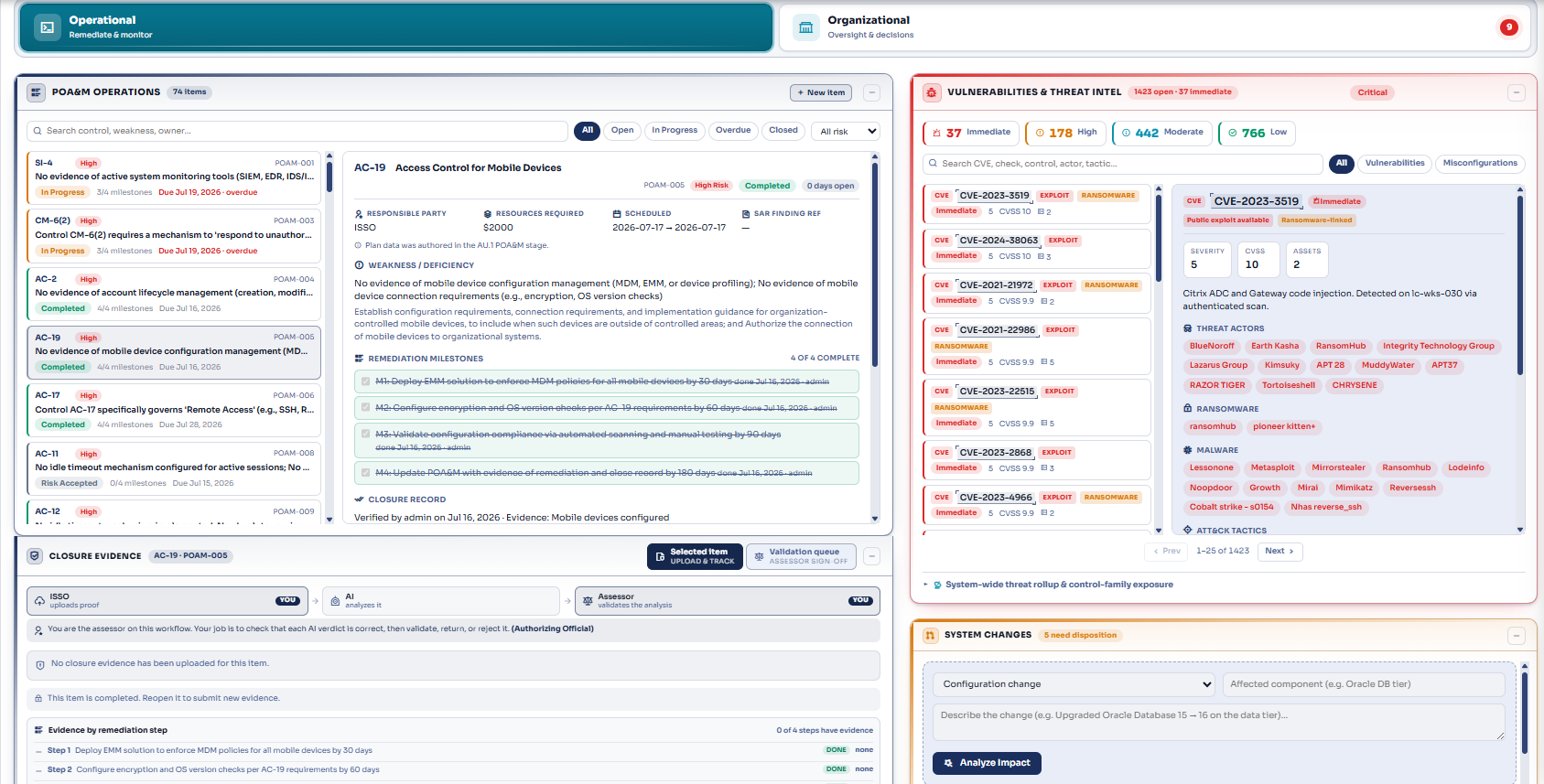
Continuous monitoring
The phase that never ends, on one dashboard
After the decision the workflow moves into monitoring and stays there. Four areas, each with its own live view.
POA&M operations
Items, milestones, evidence tagged to milestones, risk acceptance and due date extensions routed to the right seat. The controls satisfied tile is a live projection over POA&M status, not an assessment time snapshot.
Threat intelligence
The system's own findings ranked by AREA, with the actors and techniques ATIP ties to them, so the monitoring view is threat informed rather than a control checklist.
System changes and reauthorization
Significant changes recorded with their security impact, and the reauthorization path when a change crosses the line.
Control assessment cadence
Which controls are due for reassessment and when, driven by the monitoring plan the workflow generated.
Family agents
One agent per control family, assessing from real state
Access Control is assessed today by an agent reading your identity platform. The next is an Incident Response agent reading Splunk. The pattern is the same for every family: real system state in, a finding with its evidence out, a person deciding.
- Today
Access Control (AC)
Reads account, role and entitlement state from the identity platform
- Planned
Incident Response (IR)
Reads incident and alert state from Splunk
- Planned
Further families
Same pattern, extended family by family
Seven phases, twenty three stages
- 01 3 stages
Prepare
Register, assign, strategy
- 02 4 stages
Categorize
Information types, impact, the record
- 03 2 stages
Select
Baseline, tailoring, inheritance
- 04 3 stages
Implement
Resources, evidence with AI analysis, final SSP
- 05 5 stages
Assess
Plan, assessment, results, remediation, SAR
- 06 4 stages
Authorize
Risk determination, decision, letter
- 07 2 stages
Monitor
Continuous monitoring, permanent
Actions are role gated and every approval is recorded. Which seat holds which step, and which stages apply, is being made configurable per agency, because the same people are not involved everywhere.
See what each seat getsStraight answers
Does the AI close controls on its own?
No. AI analysis produces a determination for a human to ratify or override, and the override is recorded.
Which documents are written for us?
Ten today, generated from the inputs you give the workflow: the FIPS 199 categorization, SSP, SCTM, SAP, SAR, POA&M, authorization package, authorization letter, monitoring plan and monitoring status report. The other documents an authorization needs are tracked in the Documentation Bank today, and generators for them are planned as their templates are built.
What happens after authorization is granted?
The workflow moves into continuous monitoring and stays there. It does not regress to earlier phases.
Can we import a system that already has an ATO?
Not yet, this is planned. The intended path brings an existing package straight into continuous monitoring rather than restarting at phase one.
How long does it take?
The workflow keeps a clock from the day a package is created, one per phase, and AI analysis time separately, so you will have that number for your own system rather than ours.
Walk a package from prepare to monitor, with the AI doing the reading.
Ask for a demo and we will run a synthetic system through the phases with you: evidence analyzed, documents generated, monitoring dashboard live, clock running.